For home walls
The wall in your garage, with a problem list.
Sprai is a home wall app. Take one photo and every hold on the wall is mapped. Then you and your friends set problems on it, grade them, and can still find them months later.


Free to map your wall, every time you map it.
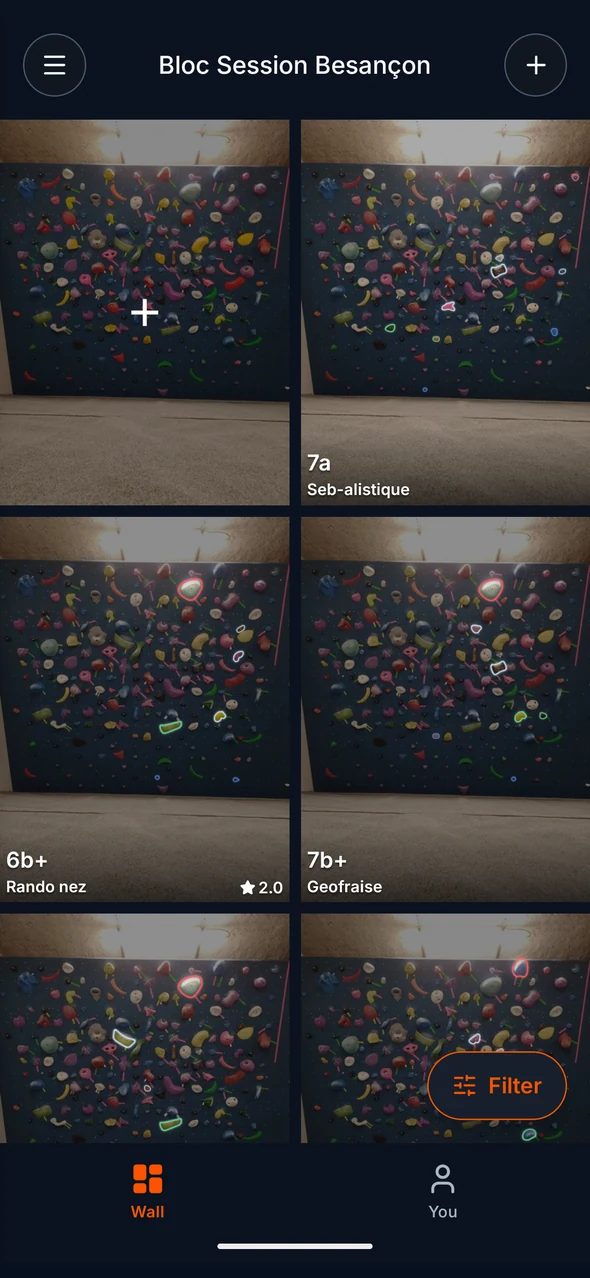
One photo, every hold
You photograph the wall, Sprai outlines the holds, and you tap them to set. You get the map straight away: there is no queue, and nobody has to approve your wall before you can use it.


Why home walls specifically
You will move the holds around
Re-photograph the wall whenever you rearrange it. Changing your wall never costs you anything in Sprai, on any plan.
Two people is enough
A shared problem list is worth it even for a small group. Invite whoever climbs at your place and the problems, grades, and ratings build up from the first session.
Small walls, dense holds
Garage and basement walls have holds close together. Detection handles that, and problems are drawn on the real hold outlines instead of circles you place by hand.
It works without signal
Your walls and problems are stored on your phone as well as on our servers, so the app still works in a basement or a garage with no reception.
How big does my home wall need to be?
There is no minimum. Sprai works on anything from a single 8 by 8 panel to a full garage wall, as long as you can get the whole thing into one photo from far enough back.
What if I move holds around?
Mapping a wall is free every time, so you can re-photograph it as often as you want. Today a big change means mapping the wall again from scratch. We are building wall reset so a new photo keeps the problems that still work and shows you which ones the change affected.
Does it cost anything?
No. Mapping up to three private walls, setting as many problems as you like, filtering, grading, rating, and marking sends are all free. Sprai Pro raises the limits if you want more walls, more videos, or the hold heatmap.
Can friends use my wall without paying?
Yes. Send them an invite link. Anyone you invite can set, grade, rate, and mark sends on your wall on the free plan.
Map your home wall
Free on iOS and Android. One photo and every hold on the wall is mapped.
The free plan covers three private walls, as many problems as you want to set, and as many wall photos as you need.